Signed in as:
filler@godaddy.com
CLTK v2.0 introduces a unified launcher, verified add-ons, redesigned templates, and an integrity-first automation framework. Digitally signed, SHA-256 validated, and engineered for real environments. Controlled. Traceable. Fully offline. Terminal-first. Offline-first. Built for ownership.
CLTK v2.0 introduces a unified launcher for scripts, templates, reports, and documentation. Modular add-ons can be installed and validated locally without modifying the core toolkit.
All modules are digitally signed and SHA-256 validated to ensure authenticity and provenance. Templates are structured for audits, diagnostics, and reporting — with outputs aligned to the Precision Build framework.
All verification, execution, and enforcement remain local.
Access the Constant Labs™ Portal to download the latest and previous Precision Build releases, view QA-verified documentation, and access version-aligned deliverables. All verification, integrity checks, and enforcement remain local and offline within the toolkit.
Components are tested in controlled environments to ensure repeatable, trusted execution.
Validated automation workflows for audits, diagnostics, reporting, and documentation.
Client-ready templates for reporting, audits, diagnostics, compliance, and build documentation. Structured for traceability and aligned with Precision Build standards.
Register once to access Tactical Kit releases and future Precision Build updates. All releases are delivered as signed, versioned artifacts for local installation.
All modules are digitally signed, checksum validated, and provenance-tracked to ensure authenticity, ownership, and tamper resistance.
Integrate Add-Ons to extend workflows and capabilities without modifying the core toolkit or compromising integrity.
Every release undergoes multi-stage QA validation for functionality, compliance, documentation accuracy, and build integrity.
Access the Constant Labs™ Portal to download Precision Build releases, SHA-256 manifests, and QA-verified documentation. All verification and enforcement remain local and offline.

Run this command in PowerShell:
Get-FileHash .\Constant_Labs_Tactical_Kit_v2.0.7z -Algorithm SHA256
Expected SHA-256:
Available in the Verification Portal.
(official release record)
Access the official release hash and validation records before execution.
Verification is recommended for controlled environments.
A central workspace for scripts, templates, reports, and add-ons — designed for modular, reliable execution.
Install trusted extensions without modifying the core toolkit or compromising integrity.
Every module is digitally signed, checksum validated, and version-tracked to ensure traceable, trusted execution.
Validated auditing, diagnostics, and control workflows engineered for PowerShell 5.1+ environments. Designed for reliability, traceability, and production-ready execution.
Client-ready templates for reporting, planning, dashboards, and compliance documentation aligned with industry QA standards.
Receive Precision Build releases, integrity updates, and documentation refinements through catalog-verified, digitally signed distributions.

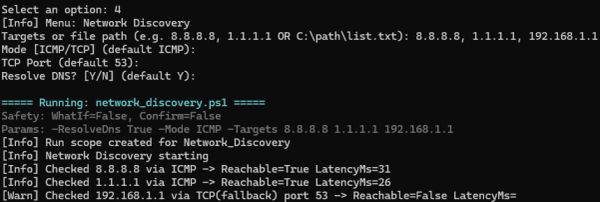
From the Tactical Kit Launcher, select Network Discovery and define your targets (e.g. 8.8.8.8, 1.1.1.1, or internal hosts).
The module performs reachability testing, latency measurement, DNS resolution, and connectivity validation using controlled methods. All activity is logged and executed within the CLTK environment.

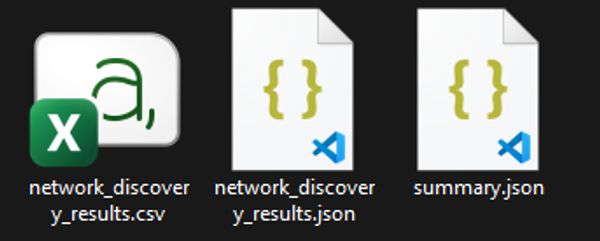
Once complete, CLTK generates a structured output set including CSV, JSON, and summary files.
Each output is timestamped, traceable, and aligned with the Precision Build framework for reporting, documentation, and automation.

Generated outputs can be opened in Excel or JSON viewers, or integrated into other CLTK modules. Engineers can document reachable hosts, analyse connectivity, and incorporate results into planning, audit documentation, or compliance reporting. All outputs maintain consistent formatting and audit-ready traceability.
See how the Tactical Kit performs network discovery, validation, and reporting in a real environment. Executed locally. No external dependencies.
The Tactical Kit is engineered using the Precision Build Framework. This system governs validation, signing, documentation, and version control to ensure auditable execution, ownership, and engineering reliability.
Includes a unified launcher, PowerShell tools, audit dashboards, reporting templates, and verified add-ons for local execution. Designed for automation, diagnostics, compliance reporting, and documentation workflows without external dependencies.
Every module is digitally signed and checksum validated to ensure authenticity and prevent tampering. Version lineage, provenance, and certification records are preserved through the Constant Labs™ reference system.
You retain full access to the Tactical Kit, including signed releases, documentation packs, and catalog-verified updates. No subscriptions, cloud reliance, or time-based restrictions. Designed for offline ownership and version integrity.

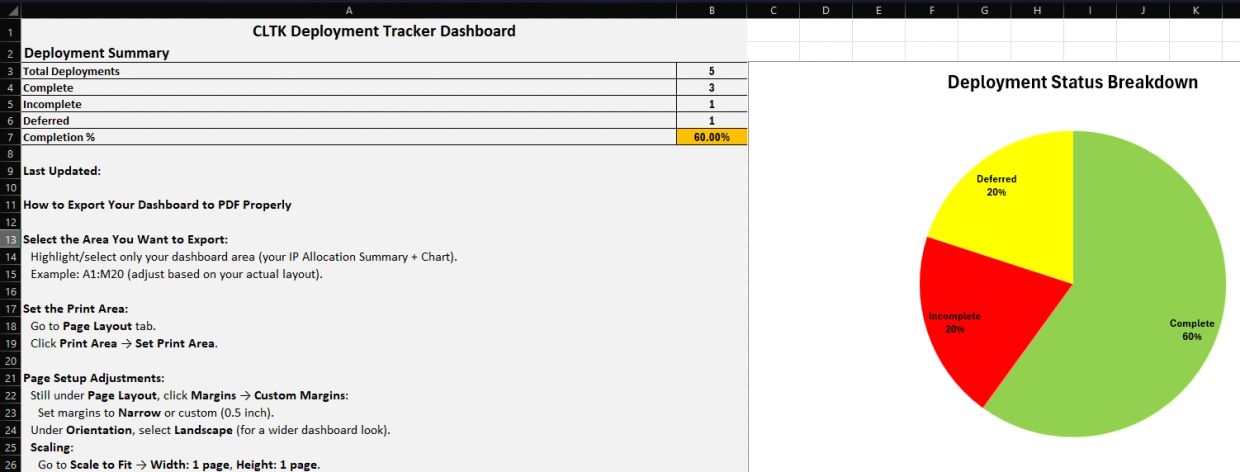
The Tactical Kit produces deployment tracking dashboards with structured project metadata, status tables, and visual summaries such as completion reports.
All outputs are consistently formatted, traceable, and aligned with the Precision Build structure for client delivery, internal review, and compliance documentation.
CLTK is designed for validation, diagnostics, and controlled execution in real-world engineering environments —
not for offensive security or unrestricted scripting.
For engineers who build, automate, and document technical workflows. Ideal for audits, diagnostics, scripting, and system administration in Windows-based environments.
For analysts and security teams requiring signed tools, SHA-validated documentation, and tamper-resistant workflows for compliance, reporting, and integrity assurance.
For professionals who plan networks, document infrastructure, generate technical reports, and deploy repeatable, command-driven automation securely and offline.
For learners preparing for exams or building portfolios. Demonstrates structured documentation, automation practices, and real-world engineering standards.
Engineering · Cybersecurity · Infrastructure · Learning
Get access to the Precision Build release of the Constant Labs™ Tactical Kit. Register once to download digitally signed releases, SHA-256 verified materials, and catalog-aligned versions as they are published.
To validate your environment before first run, use the CLTK Preflight Check. This standalone utility verifies PowerShell compatibility, execution policy, and certificate readiness.
Use if anything appears unexpected during setup or initial execution. Includes signed releases and SHA-256 verification via the Verification Portal.
Downloading the kit is the first step. The CLTK v2.0 onboarding module guides you through safe extraction, integrity verification, launcher usage, and core validation — entirely offline and at your own pace.

Each stage — from SHA-256 validation through to code signing and catalog integrity checks — is executed locally, before runtime.
This model ensures two critical guarantees:
• Integrity — The release has not been modified after publication
• Provenance — The code originates from the expected publisher
While no system can guarantee intent, CLTK v2.0 is engineered to eliminate tampering, corruption, and unauthorised modification through layered verification.
Note: The release archive itself is verified via SHA-256. Code signing applies to the executable modules within the toolkit.
The Tactical Kit is a unified, integrity-verified automation framework for real-world engineering environments. It combines a central launcher, structured templates, and validated workflows into a controlled system designed for reliable, auditable execution.
Version 2.0 introduces a modular launcher, verified add-ons, a checksum-validated framework, redesigned templates, and improved automation built on the Precision Build Framework. Every module is digitally signed and SHA-256 validated, ensuring integrity and traceability across all components. Existing users can upgrade via the latest Precision Build release.
The Tactical Kit includes a unified launcher, automation modules for audits, discovery, troubleshooting, and testing, structured documentation templates, and a signed, version-controlled module set. All components are self-contained and run entirely offline with no external dependencies.
Unlike standalone scripts, the Tactical Kit enforces consistency, traceability, and validation through a governed build system. All modules are signed, version-controlled, and aligned to a structured framework — ensuring reliable, repeatable, and audit-ready outputs.
The Tactical Kit is designed for IT professionals, network engineers, system administrators, and cybersecurity practitioners who require reliable, validated, and repeatable workflows. It is also suitable for technical learners building structured, real-world engineering practices.
Yes. The kit operates entirely offline with no external calls, telemetry, or dependencies. All validation, execution, and reporting occur locally, making it suitable for secure, restricted, and air-gapped environments.
Every module is digitally signed and SHA-256 checksum validated. The Precision Build framework preserves version lineage and provenance, ensuring each component is authentic, traceable, and protected against tampering.
Download and extract the kit, open PowerShell, and run .\tactical_kit_launcher.ps1. The launcher provides access to all modules and documentation. No installation process or additional setup is required.
Yes. The toolkit is engineered to enterprise standards and is suitable for MSPs, regulated industries, corporate networks, and engineering teams requiring consistent, audit-ready outputs.
Only PowerShell (included with Windows) and Word or Excel for documentation templates. No external software or dependencies are required.
No. All tools run in standard user context unless a specific script requires elevation, which is rare and clearly indicated.
Yes. Teams can run the kit from shared environments or version-controlled repositories to maintain consistent workflows. The modular architecture supports multi-user usage without configuration conflicts.
The Tactical Kit is designed to operate without internet access to support secure, restricted, and air-gapped environments. All validation, execution, and reporting occur locally, ensuring full operator control, reduced external risk, and consistent behaviour across environments.
Download the latest Precision Build and extract it to a new directory. Upgrade guidance is included in the documentation. This approach preserves validation integrity and avoids conflicts with previous versions.
Yes. The modular architecture supports verified add-ons that extend functionality without modifying the core framework. This allows controlled expansion while preserving integrity, validation, and version consistency.
The Precision Build system governs how the toolkit is structured, validated, and released. Each build is version-controlled, signed, and aligned to a defined reference, ensuring consistent behaviour, reproducibility, and auditability across environments.
Yes. You retain full local ownership and can use the kit indefinitely. New Precision Build releases are available through the portal, and updates are applied manually, preserving full control and offline verification.
For support or enquiries, contact support@constantlabs.io or use the Contact page. Support sessions are focused on validation, integrity, and execution guidance.
Download Tactical Kit v2.0 — Built for Ownership Access the Precision Build release of the Constant Labs Tactical Kit. Register once to download digitally signed releases, SHA-256 verified materials, and catalog-aligned updates. All verification and execution remain under your control.
Built by Anthony Constant · Powered by Constant Labs™
© 2026 Anthony Constant · All rights reserved
CLTK v2.0.0 • Certified Precision Build • 20260105

Deploy a locally verified Tactical Kit with built-in workflows, version validation, and controlled add-on support.
We use cookies to enhance site functionality, improve performance, and analyse usage. You can choose to accept or decline non-essential cookies. Essential cookies are always active for site operation. For more details, see our Cookie Policy.